For people buried in notes
You were never going to keep up with folders and tags, and you should not have to. Write things down. Valorune brings the right note back when you need it.
Available soon
One-time purchase.
For people buried in notes
You were never going to keep up with folders and tags, and you should not have to. Write things down. Valorune brings the right note back when you need it.
One-time purchase.
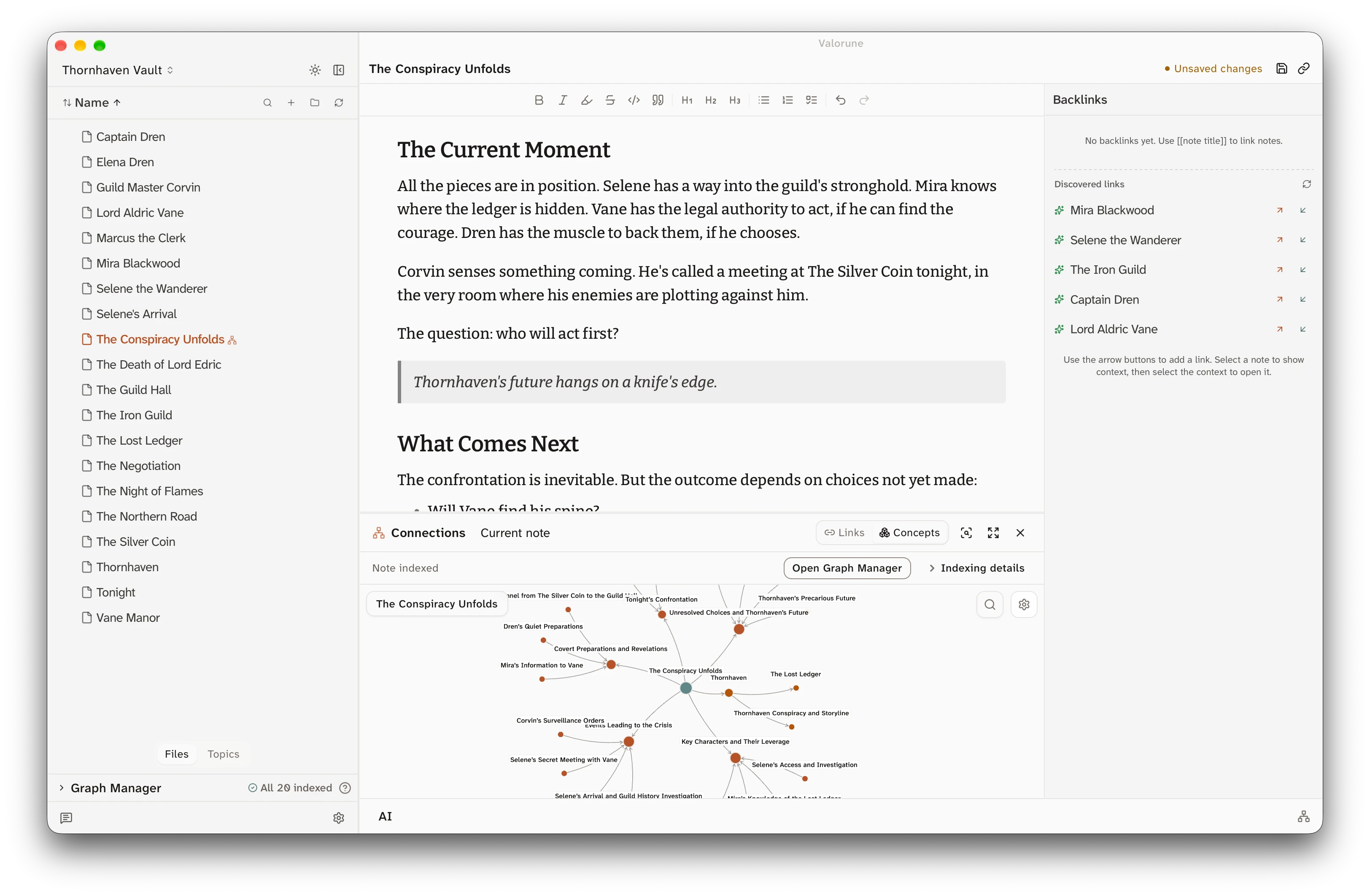
Nobody filed, tagged or linked anything in this window.
The work around the work
Look at what one note asks of you before you can get back to thinking.
Work / Research / 2025 / Q3 / choose folder
Buyer interviews, round one
Link to related notes: search…
Status: unfiled
Nearly everyone asked the same thing first.
Five decisions before the first sentence
Buyer interviews, round one
Nearly everyone asked the same thing first: will it work with the notes I already have?
Two people said they had stopped taking notes at all, because filing them had become a second job
No decisions. Just the note.
“Once I’m backlogged without having organized up front, I’m screwed; notes may as well go into a blackhole.”
Why it lasts
Topics form from what you actually wrote. The more you add, the easier everything is to find.
First week
A handful of notes. A few already connect.
First year
Topics you can see, without having made them.
Year five
A map of what you know, still easy to search.
Illustration of one vault growing. Orange marks are topics; none were created by hand.
While you work
And you would never have found it. Valorune puts it beside the page at the moment you need it.
Launch plan
Open with the questions buyers ask first, then the price. Keep the page short enough to read in one sitting.
Second section: what changes for them in the first week
Suggested
Buyer interviews, round one
Nearly everyone asked the same thing first: will it work with the notes I already have?
Written 14 months agoLink here
Pricing ideas I dropped
Monthly plans tested badly. People said they were tired of renting.
Written last springLink here
From early users
“The most promising step away from digital janitorial work I have seen in years.”
“I stopped worrying about where to put things.”
“It turns the database into a conversation partner rather than a storage unit.”
What it costs
No monthly plan and no credits to top up. One payment, and the app is yours.
A monthly plan
and every month after
Valorune
nothing after the first
On your disk
No account holds your notes and no format hides them. Each one is a Markdown file you can open, copy and back up like any other.
Plain text
Readable in any editor, on any computer, with or without Valorune.
Reading list.md
Pricing ideas I dropped.md
Launch plan.md
Buyer interviews, round one.md
# Buyer interviews, round one

Nearly everyone asked the same thing
first: will it work with the notes
I already have?

- Two had stopped taking notes
- Filing had become a second job

See [[Launch plan]].
In your own folder
Copy it, back it up or move it the way you do any other file.
Always current
Written again every time you save. There is nothing to export.
Privacy
Your notes and how you use the app stay with you.
Your notes are Markdown files on your disk. We keep no copy.
Indexing sends only the notes you choose, to the provider you chose.
Getting started
Bring them as they are, with no tidying up first, and Valorune is useful the same day. Or start fresh with an empty vault.
Open a copy of your Markdown folder. Your originals stay as they are.
Connect an AI subscription you already have. Keep writing meanwhile.
Notes you forgot you had turn up beside the page as you write.
Built by someone who has worked on enterprise knowledge bases, where finding things was always the hard part.
The seven-day look inside
Use it for a week. If Valorune has not handed you back something you had forgotten, you get your money back.
Seven days is the window to ask. Read the refund policy.
Every cent back
A full refund of what you paid.
Seven days to ask
Email hello@valorune.app within seven days of buying.
No questions
You do not have to say why, or try a fix first.
Before you buy
Your notes
Yes. Open a folder of Markdown files as a vault and Valorune takes them as they are, mess included. Index them once and related notes start turning up. Work on a copy if you want your originals left untouched.
Nothing. Every note is a Markdown file in a folder on your disk, updated every time you save. They open in a file explorer or any other editor, with or without Valorune, so there is nothing to export first.
The AI
Not to write, search or link notes. Suggested notes and topics need your notes indexed once, and indexing runs through an AI subscription you already have. ChatGPT is supported today. Valorune sells no AI and adds no markup; your provider may count the usage against your plan.
Only the notes you choose to index, sent to your AI provider through your own account, and only when you start it. After that, related notes are matched on your computer. Valorune runs no AI servers of its own.
Then you ignore it. Suggested notes are only suggestions: you decide which to link, and nothing is added to a note unless you choose it. Wiki-links let you make a definite connection when you want one.
It does not tag, sort or rewrite anything, and there is no chat box. Valorune works out how your notes relate and puts the right one beside the page while you write. Your words stay yours.
Buying
The app, for one person on two devices, with future app updates. There is no subscription and there are no credits. Your AI provider's plan is separate. Activation needs your purchase email. The purchase page has the full conditions.
Ask within seven days of buying and you get a full refund. You do not have to say why. Email hello@valorune.app.
macOS 14 or later on Apple Silicon, and Windows 11 x64. Other platforms are planned; no date yet.